> For the complete documentation index, see [llms.txt](https://docs.openstamanager.com/llms.txt). Markdown versions of documentation pages are available by appending `.md` to page URLs; this page is available as [Markdown](https://docs.openstamanager.com/2.8.3/guide/esempi/permessi-di-visualizzazione-degli-utenti.md).
# Permessi di visualizzazione degli utenti
Come gestire i permessi di visualizzazione dei vari gruppi di utenti
{% hint style="info" %}
In OpenSTAManager è possibile definire diverse categorie di utenti con permessi specifici dal modulo [Strumenti/Utenti e permessi](/2.8.3/openstamanager/modules/strumenti/utentiepermessi.md).
{% endhint %}
#### Esempio
Volendo abilitare la visualizzazione di tutte le attività ad ogni utente registrato come tecnico (anzichè permettere la sola visualizzazione delle proprie), si dovrà:
{% hint style="warning" %}
Accedere come amministratore.
{% endhint %}
Abilitare il modulo Viste da Stato dei servizi, in caso sia disattivato (opzione di default).
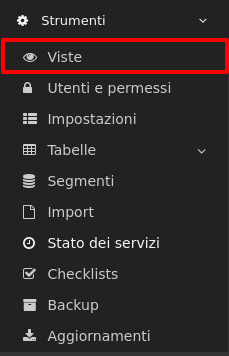
Da qui, si dovrà selezionare il modulo Attività e andare alla sezione Filtri. E' qui possibile vedere l'elenco dei filtri attivati e attivabili inseriti di default.
Per permettere ai tecnici di visualizzare tutte le attività si dovrà quindi andare a disabilitare il filtro "Mostra interventi ai tecnici coinvolti".

{% hint style="info" %}
Mostra interventi ai tecnici coinvolti se abilitato permetterà ai tecnici di visualizzare solo le attività che gli sono state assegnate o a cui sono collegati.
Mostra interventi ai clienti coinvolti se abilitato permetterà ai clienti di visualizzare solo le attività richieste.
Mostra interventi ai tecnici assegnati se abilitato permetterà ai tecnici di visualizzare solo le attività a cui sono stati assegnati.
{% endhint %}
---
# Agent Instructions
This documentation is published with GitBook. GitBook is the documentation platform designed so that both humans and AI agents can read, navigate, and reason over technical content effectively. Learn more at gitbook.com.
## Querying This Documentation
If you need additional information that is not directly available in this page, you can query the documentation by asking a question.
Perform an HTTP GET request on the following URL with the `ask` and `goal` query parameters:
```
GET https://docs.openstamanager.com/2.8.3/guide/esempi/permessi-di-visualizzazione-degli-utenti.md?ask=&goal=
```
`ask` is the immediate question: it should be specific, self-contained, and written in natural language.
`goal` is what the user is ultimately trying to achieve, the reason they need the answer. Sharing it helps GitBook give you a better, more relevant answer. A goal is most helpful when it describes the outcome the user wants rather than restating the question. For example, with `ask=how do I create an API token`, a goal like `automate deployments from our CI pipeline` lets GitBook tailor the answer to that use case.
The response will contain a direct answer to the question and relevant excerpts and sources from the documentation.
Use this mechanism when the answer is not explicitly present in the current page, you need clarification or additional context, or you want to retrieve related documentation sections.